
Asset Tagging BIM Services
Create smarter and more manageable digital building assets with professional Asset Tagging BIM Services. We enrich BIM models with structured asset identification, equipment information, location data, and project-specific parameters to make building assets easier to identify, track, and manage. Our team supports asset tagging for architectural, structural, and MEP components, helping transform BIM models into useful information resources for facility management, operations, maintenance, and asset lifecycle management.
Improve BIM Asset Identification and Information Management
A BIM model becomes more valuable when individual building assets can be clearly identified and connected with useful information. Asset tagging helps organize equipment, systems, components, and maintainable assets within the digital model.
Our Asset Tagging BIM Services focus on assigning structured identification and information to relevant model elements. We review BIM data, identify asset categories, apply appropriate tags or parameters, and organize information according to project requirements.
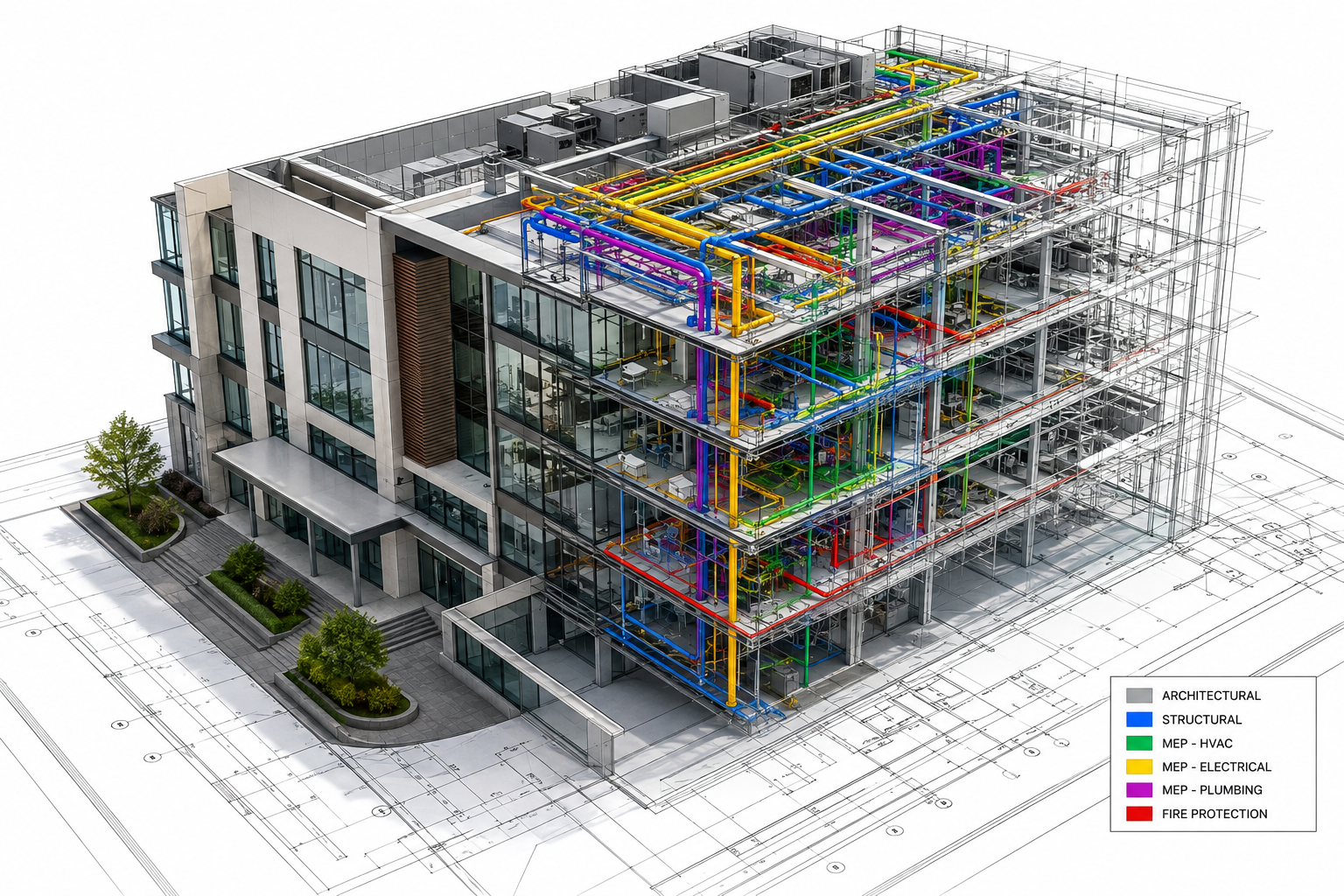
Our Asset Tagging BIM Services
Asset Tagging & BIMOur asset tagging solutions help convert BIM models into structured asset information databases that can support project handover, facility management, and ongoing building operations.
Our Asset Tagging BIM Services - Key Capabilities
Our asset tagging workflow combines BIM model review, asset identification, structured information, and quality control to produce organized and usable digital asset data.
Asset Identification & Classification
Identify relevant building components and classify them according to the asset structure established for the project.
- Equipment identification
- Asset categorization
- Building component classification
- Location-based identification
- Maintainable asset mapping
Asset Tag & ID Assignment
Create a consistent identification structure for assets across the BIM model.
- Unique asset IDs
- Tag number assignment
- Equipment codes
- System-based identification
- Location references
Asset Information Integration
Connect asset tags with relevant technical and operational information.
- Manufacturer details
- Model information
- Specifications
- Installation data
- Warranty information
- Maintenance-related parameters
Asset Schedule & Data Review
Organize asset information into structured schedules and review the model for data consistency.
- Asset schedules
- Equipment lists
- Parameter checks
- Data completeness review
- Model-to-asset validation
Technology-Driven Asset Tagging BIM Services
We use BIM and coordination technologies to develop structured asset information while working within the client's existing project environment and data standards.





Asset Tagging BIM Services for Real-World Building Projects
Asset tagging can be integrated into BIM workflows for projects where accurate equipment identification, model coordination, and structured building information are important.
Structural BIM for Educational & Religious Facilities
High-precision Structural BIM Modeling and Drafting for large-scale educational and religious infrastructure projects in New York, USA.
Hyperscale Data Center — BIM Modeling & Coordination
Comprehensive Data Center BIM Modeling, MEP coordination, clash detection, and construction documentation support for a large-scale 15+ acre hyperscale data center project.
Park Field — Residential & Commercial BIM Coordination
High-detail BIM Modeling and MEP Coordination for a B+G+P+19-floor mixed-use residential and commercial development, delivered at LOD 400.
Asset Tagging BIM Services Across Industries
Our asset tagging workflows can be adapted to different building types, asset categories, project phases, and facility management requirements.

Residential
Villas, Apartments , Townhouses, Residential complexes, Housing developments, .

Commercial
Office buildings , Corporate facilities ,Commercial complexes , Business parks

Educational
Schools , Colleges ,Universities ,Training centers ,Institutional buildings

Healthcare
Hospitals , Clinics , Medical centers , Diagnostic facilities , Healthcare campuses

Infrastructure
Public facilities, Civic buildings ,Transportation-related buildings , Infrastructure facilities
Our Asset Tagging BIM Services Workflow
A structured workflow helps ensure that asset information is accurately associated with the correct BIM elements and follows the project's information requirements.

Project Assessment
We review the project scope, existing BIM model, asset requirements, information standards, tagging methodology, and expected deliverables.

BIM Model & Asset Data Review
Our team examines the supplied models, drawings, equipment schedules, specifications, and available asset information to understand the project’s data requirements.

Asset Identification & Tagging
Relevant model elements are identified and assigned asset tags, IDs, classifications, and required parameters according to the approved tagging structure.

Data Validation & Client Review
Tagged elements and associated information are checked for completeness, consistency, and correct model association. Client comments and approved revisions are incorporated.

Final Delivery
The completed BIM model, asset schedules, and related information are delivered in the agreed formats and according to project naming, data, and documentation standards.
Frequently Asked Questions
Answers to the questions we hear most often about our BIM Services.
Let’s Build Your Next Engineering Project
From precision CAD drafting and 3D architectural modeling to coordinated BIM and structural detailing, we deliver accurate, construction-ready solutions. Share your project requirements and get an engineering solution tailored to your scope, timeline, and standards.
- Fast Response Get a response within 1 business day
- Expert Project Support Dedicated engineering coordination project
- Flexible Engagement Start with a consultation
- 98% Quality-Focused Delivery 127+ projects
SCHEDULE A CONSULTATION
Tell us about your project
Our Global Presence